

Pinterest Keywords: What They Are and How to Use Them
If you’ve been in the Pinterest world lately or trying to revamp your Pinterest strategy, you’ve probably heard this before:
Pinterest is not social media.
It’s a search engine.
And yes, that’s completely true.
Once that idea really clicks, everything about how you use Pinterest to market your business starts to make a whole lot more sense. Instead of chasing trends or worrying about engagement for 24 hours, you’re building content that gets discovered over and over again by people already looking for what you offer.
And the foundation of that system?
KEYWORDS.
In this post, you’ll learn what Pinterest keywords are, why they matter, and exactly how to use them so your Pins reach the right people and actually drive traffic, visibility, and sales.
What Are Pinterest Keywords?
Pinterest keywords are the words and phrases your ideal audience types into the Pinterest search bar.
They are how Pinterest understands what your content is about and who should see it.
For example, if someone searches “spring outfits,” Pinterest looks for Pins, boards, profiles, and content that include those words. If you’ve used that phrase in your Pin title, description, board name, or profile, your content has a much higher chance of showing up.
In simple terms:
Keywords tell Pinterest what you offer so it can show your content to people already searching for that solution.
That’s powerful because it means:
- More visibility
- More targeted traffic
- More trust with your audience
- And all of it happens organically, without paying for ads
Whether you’re a blogger, service provider, coach, or product-based business, keywords are what help the right people find you.
If you want a fast way to set this up correctly, my Pinterest Quick Start Guide walks you through optimizing your account in under an hour so you can start attracting traffic, visibility, and sales quickly. It covers keywords, profile optimization, boards, Pins, and a little analytics so nothing important gets skipped.
Where to Use Pinterest Keywords
Here’s where your keywords should live on Pinterest:
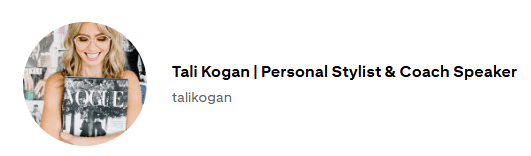
1. Profile Name
Yes, include your name, but also include what you do.
People don’t search your name. They search for solutions.
For example, instead of only:
Sarah Johnson
Try:
Sarah Johnson | Personal Stylist & Coach Speaker
That way, when someone types “personal stylist,” your profile can appear even if they’ve never heard of your brand.
2. Board Names
This is one of the most common mistakes I see.
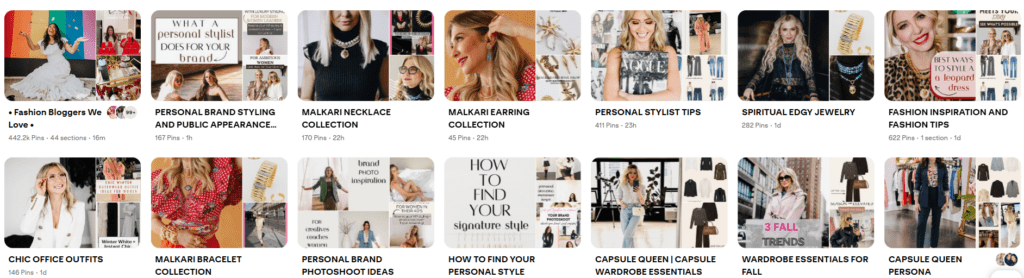
Board names should not be cute or vague.
They should match what people are actually searching for.
Instead of:
Outfits
Use:
Fashion Inspiration for Women
Work Outfit Ideas
Capsule Wardrobe Essentials
Clear keywords = more discoverability.
3. Board Descriptions
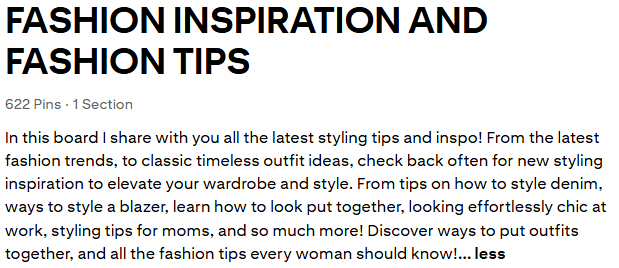
Leaving this blank is a missed opportunity.
Your board description is another place to naturally include keywords and explain what the board contains. This gives Pinterest more context about your content and helps your board appear in search.
4. Blog Post Titles & Content Ideas
Before you write a blog post or create a product, take that idea to the Pinterest search bar.
Type something like:
how to style a blazer
Watch the suggested phrases appear.
Those are real searches people are already making, and those phrases belong in your title and content.
This is one of the exact steps I teach inside the Pinterest Quick Start Guide, so you’re never guessing what your audience wants.
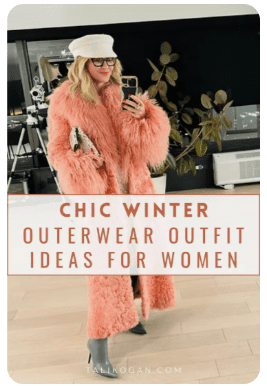
5. Pin Graphic Text Overlay
Pinterest can read your Pin graphics.
Make sure the text overlay includes keywords and clearly states what your Pin offers. This is essential for search and clicks.
6. Pin Titles and Descriptions
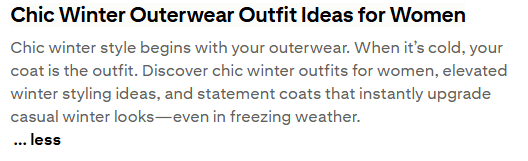
Pin Title:
Use clear phrases that describe the main idea of your Pin.
Pin Description:
Write 2–3 natural sentences using your main keyword and related phrases.
Explain what the content is about and what problem it solves.
How to Find Pinterest Keywords
It’s easier than you think:
- Pinterest Search Bar
Start typing your topic and use the suggested phrases. - Pinterest Trends
Pinterest’s free tool shows what’s trending and when topics peak throughout the year. - PinClicks (optional but powerful)
A third-party research tool that shows keyword performance, top Pins, rankings, and related searches.
I’ve been using it for about 8 months for my own account and for clients — it’s incredibly helpful for dialing in strategy.
If you’d like to try it free for 5 days, you can explore it here: Try PinClicks Here!
Tips for Using Keywords Naturally
Pinterest favors content that feels helpful, human, and problem-solving.
A few best practices:
- Write for people first, search engines second
- Use your main keyword in your title and 2–3 times in your description
- Mix short and long-tail keywords
- Keep language clear, simple, and conversational
- Use related phrases to give Pinterest more context
Your goal is to help Pinterest understand your content and make it enjoyable for real people to read.
Why Keywords Change Everything
Pinterest keywords are one of the simplest ways to grow your reach and get long-term results.
They are the foundation of discoverability on the platform.
When you use them intentionally, your content keeps working long after you publish it.
Start small. Choose a few keyword phrases that describe your next piece of content and apply them to your profile, boards, and Pins. Over time, you’ll notice more impressions, saves, and outbound clicks as Pinterest learns exactly what your account is about.
And once you understand the system, you can repeat it again and again to grow your business naturally.
If you want a simple, step-by-step way to set this up correctly, my Pinterest Quick Start Guide shows you how to optimize your account in under an hour so you can start attracting traffic, visibility, and sales — fast.
And if you’d rather have this handled for you, you can explore my Pinterest management services here.
Want more Pinterest growth strategies like this?
Join my newsletter for weekly tips on sustainable marketing, Pinterest growth, and building traffic that compounds.
Your future traffic will thank you!


Be the first to comment