

How to Use Tailwind for Pinterest: Step-by-Step Guide & Honest Review
If you’ve ever wondered how some bloggers and Pinterest creators manage to stay consistent without living on Pinterest all day, the answer is usually one tool: Tailwind.
In this guide, I’m walking you through exactly how Tailwind works, how I use it to schedule pins for my clients, and whether it’s actually worth the investment.
Estimated Read time: 8-9 minutes
If you’re like me, you create 5–8 quality pins per blog post. You’ve taken the time to do your keyword research, you create hooking text overlay phrases and add them to your graphics, heck, you’re even adding enticing CTAs to guide your ideal audience to the next step. You take the time to create pretty good-looking pins, and you have killer offers, but you aren’t getting the reach you would like.
Well, what if you could save hours weekly, schedule pins ahead of time, and get better reach while doing so?
To be honest, this is exactly what Tailwind helps with.
Tailwind is a fantastic scheduling tool that helps you keep your sanity by batching your scheduling in advance, while also supporting better reach and better results on Pinterest. Think of it as scheduling smarter and more efficiently compared to the native scheduler on Pinterest.
Are you thinking about using Tailwind for your blog? Perhaps you want to learn a little more about Tailwind before you make the investment?
You’re here because you know that Pinterest is probably going to be your number one traffic driver to your blog and the other goodies you have to offer, and yes, for many of my clients and myself, Pinterest is responsible for at least 80% of that traffic.
Alrighty, so let’s get to it.
Quick note before we dive in.
If you enjoy learning simple Pinterest strategies like this, I share weekly tips on growing blog traffic, Pinterest marketing, and sustainable content strategies with my email community. You can join the newsletter HERE!
What Is Tailwind for Pinterest?
Tailwind is an official partner for Pinterest, and it’s a scheduler for your pins. It’s a scheduler that lets you pin ahead of time, creating a consistent pinning schedule. This is probably my favorite feature because I love scheduling ahead, like setting it and forgetting it.
Why Should I Schedule Pins?
Pinterest likes you to pin consistently throughout the day. So for you to get the best results on Pinterest for your blog, you need to be pinning throughout the day rather than logging in and sharing all your pins at once.
But you probably don’t want to be pinning on Pinterest all day.
If your blogging to-do list is anything like mine, it’s never-ending. Plus, before I touch my own blog, I always prioritize my clients’ blogs and Pinterest accounts.
What Else Does Tailwind Have to Offer?
I love using Tailwind to support the different strategies I apply to my clients’ accounts.
For example, need to make duplicates or edit pins within Tailwind? There is an editing feature that helps you customize your pins if you’d like to add a finishing touch after uploading them.
You can read more about Pinterest strategies in 2026 in this post.
Join Communities to Share Your Pins
This is another big plus for using Tailwind, and I love this feature.
Tailwind Communities were previously known as Tribes, and they’re a fabulous little collaborative group designed to help you get more reach.
You share your pins in niche-specific groups, similar to your niche, which helps others easily discover and repin your content. Think of it as sharing is caring, creating faster growth, more visibility, and improved engagement all around for everyone.
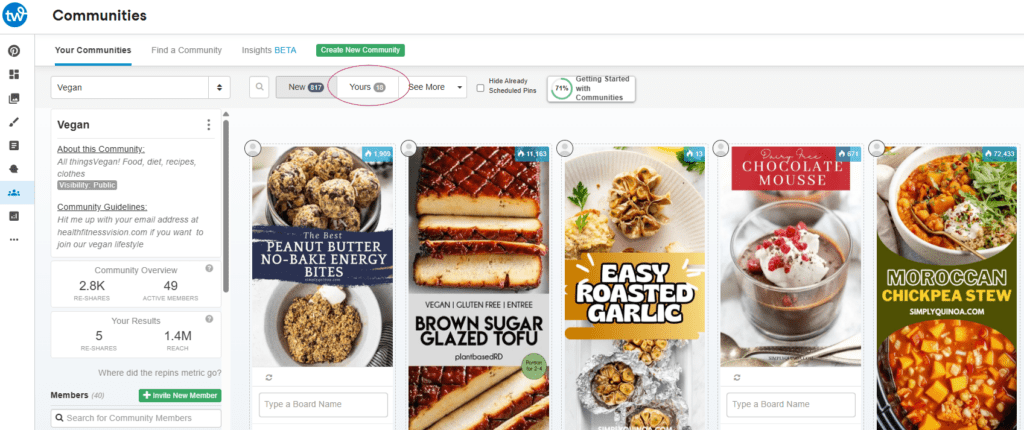
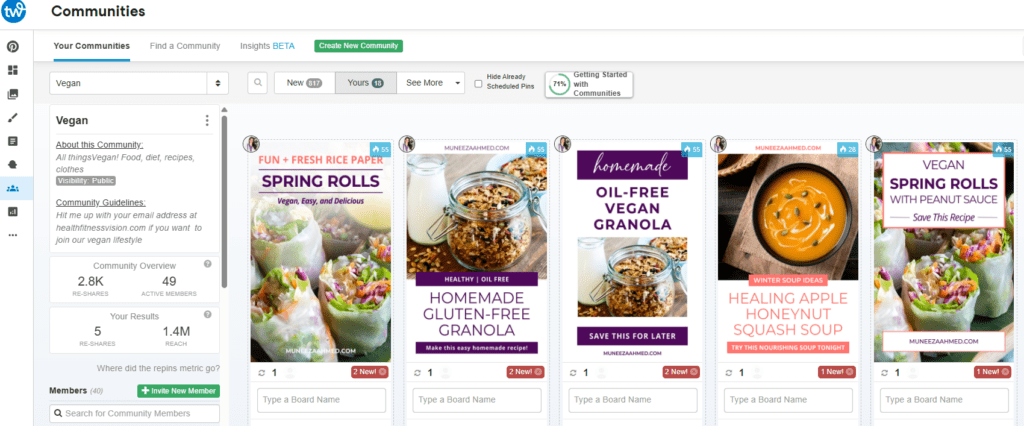
For example, in this image you can see we are part of a community named Vegan. We are fairly new to the community, and under “Yours,” you can see the amount of times our pins have been reshared.
Schedule Pins to Multiple Boards
Tailwind helps you schedule pins to multiple Pinterest boards efficiently through features like Board Lists, Interval Scheduling, and Bulk Editing.
These tools allow you to group relevant boards, spread out pinning times to avoid spam, and schedule one pin to multiple boards in just a few clicks. I usually pin to 5 up to 10 boards.
The Key Features I Love for Multi-Board Scheduling in Tailwind
Board Lists
Create customized lists of boards, for example “Gluten Free Dinners,” to instantly select multiple boards at once, saving time compared to selecting them individually.
Interval Scheduling
This allows you to set a specific time interval between pins to different boards, helping keep your content looking fresh rather than spammy. You can schedule a single pin to be posted across 10 boards over the span of a month in seconds.
Bulk Scheduler & Drafts
Upload multiple pin images, add titles and descriptions, and use the “Use Interval” feature in drafts to quickly assign them to various boards.
These tools are designed to streamline the process, allowing you to manage your Pinterest presence in less time.
There is a feature to track analytics, but I personally have never used it before because I find that it is not very effective. It doesn’t reflect real-time results compared to checking your Pinterest analytics and Google Analytics and comparing traffic results that way.
You can actually try Tailwind for free here and schedule up to 100 pins before deciding if you want to invest in the tool.
How to Start Using Tailwind
Okay, let’s get to it.
Below you can find the steps on how to start using Tailwind.
Step 1: Sign Up
Go to Tailwind for Pinterest, click on Sign Up or Start Free Trial, and then you’ll want to connect and sync your Pinterest account.
The easiest way to do this is by already being logged in to your Pinterest account, it makes it super easy to sync once Tailwind prompts you.
Ste 2: Explore the Dashboard
Here you’ll see the main features I use most:
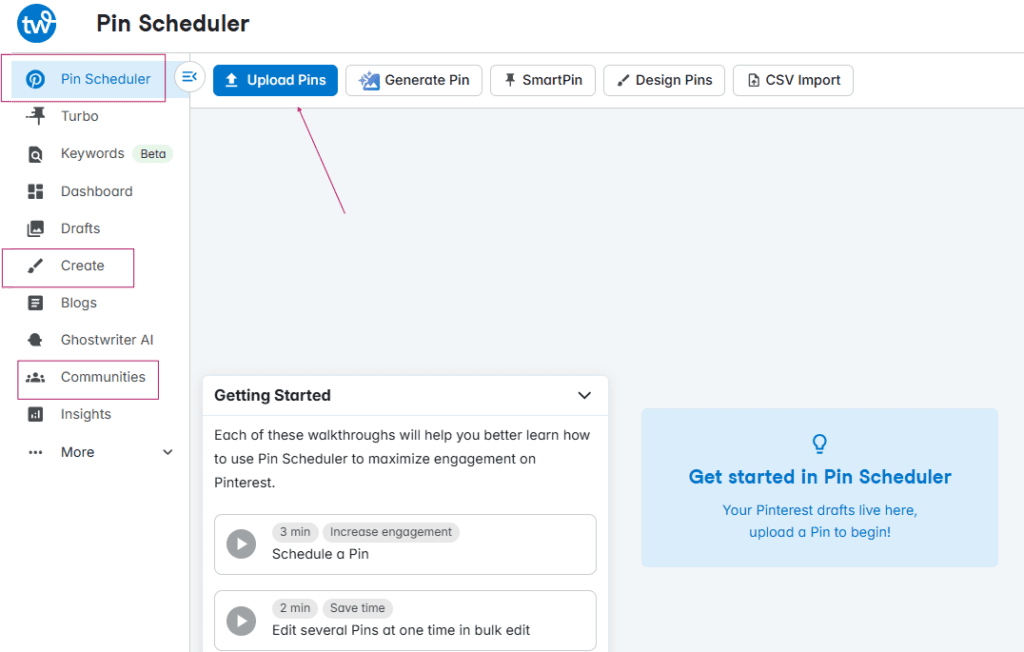
Publisher / Schedule → Schedule pins
Communities → Share pins with niche groups
Step 3: Schedule Your First Pins and Create Your Pinning Schedule
You can see that I have 0 pins in my drafts. To add your new pins, you’ll want to click on Create New Pin, where you can upload your pins.
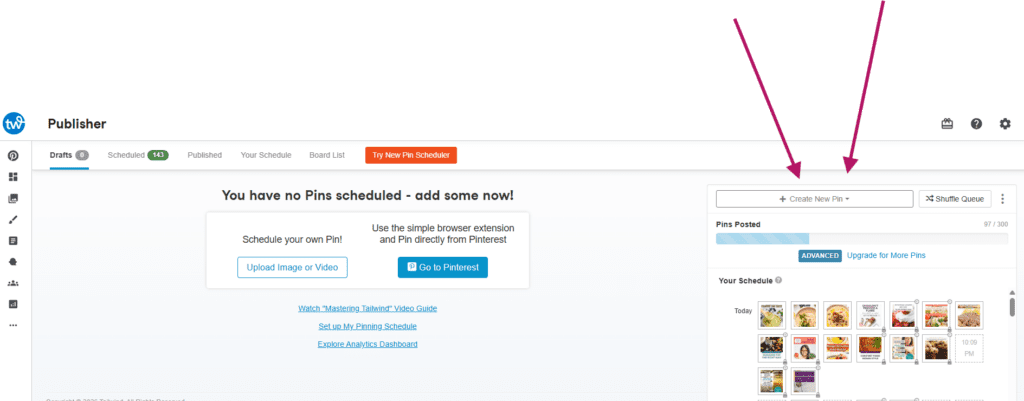
Upload your pins:
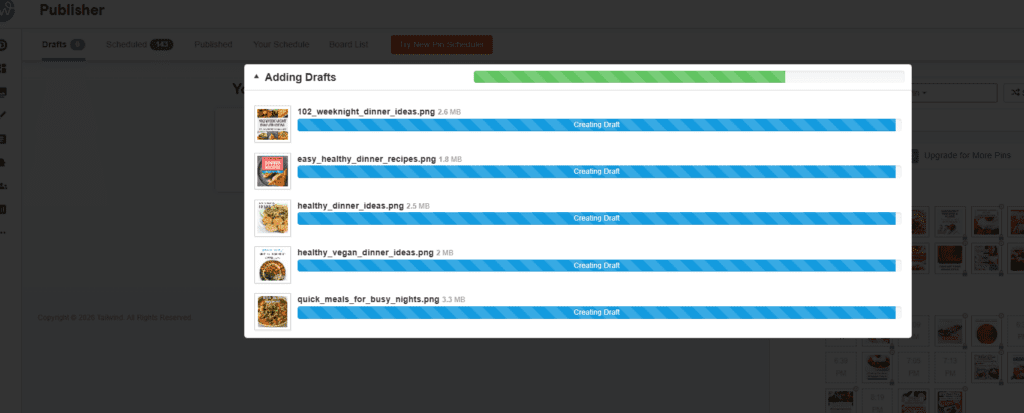
You’ll see your newly uploaded pins appear in drafts.
Now you’ll want to add your pin title, pin description, and choose your board(s). Don’t forget to add your destination URL.
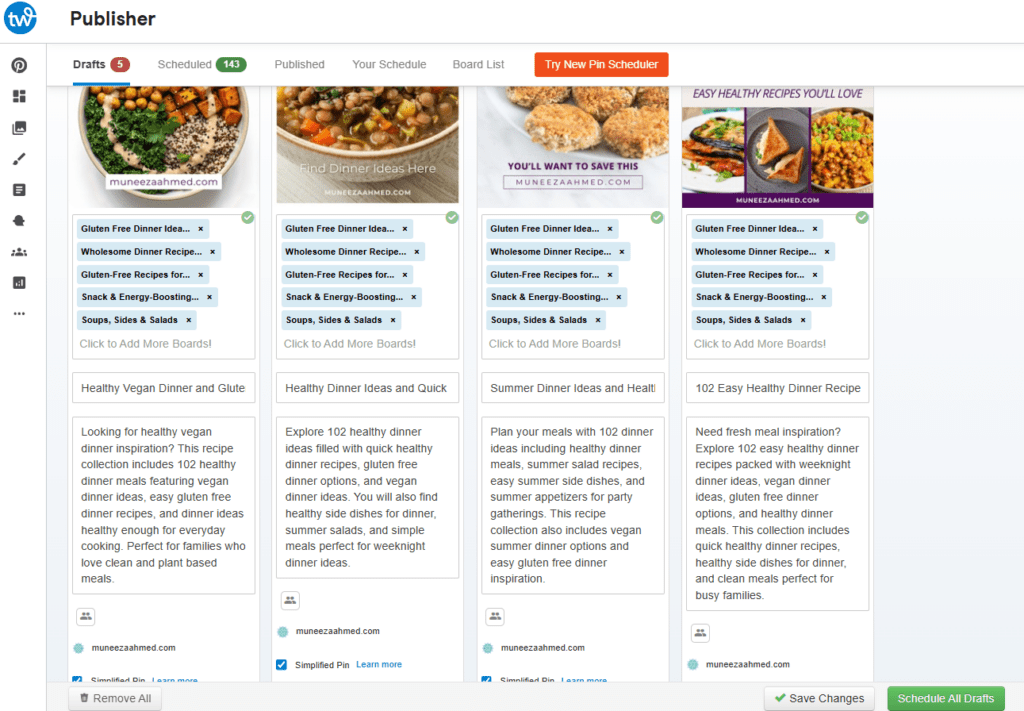
For the time slot, Tailwind recommends the best times to post based on engagement.
Pro Tip:
Schedule multiple pins at once. Use different designs for the same blog post or product to test what works best.
As you can see here, I have created five pins for this blog post, and I’m excited to see which ones perform best.
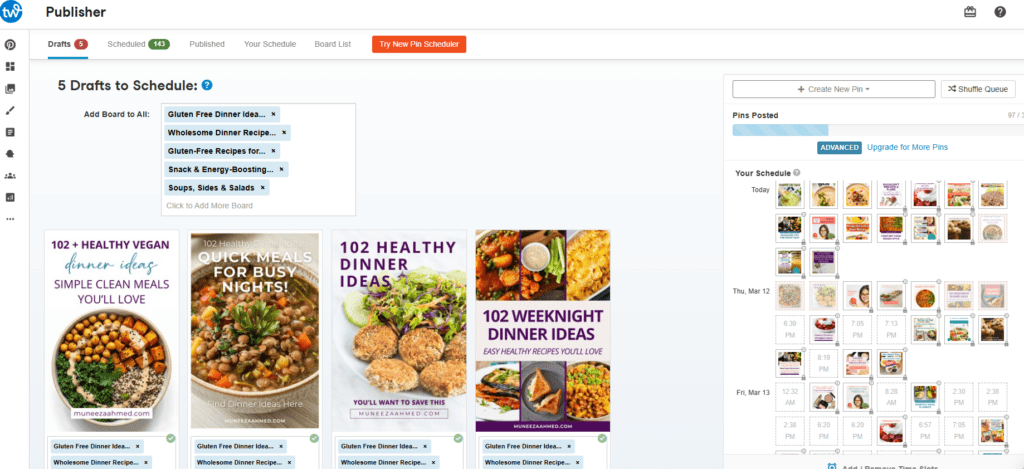
Increasing My Reach Using Tailwind
In the past I have mentioned Tailwind before. However, in this post I can assure you that Tailwind is definitely worth it.
So yes, I would say that Tailwind has helped my clients’ traffic and visibility.
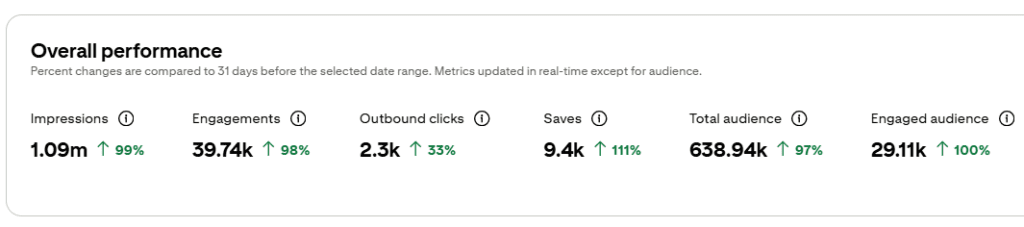
But is Tailwind responsible for these great results?
Tailwind has helped me obtain great results for my clients, but it’s not all due to Tailwind. Just because I was using Tailwind for these accounts doesn’t mean it alone is responsible for better reach.
There are a number of other factors that have helped me achieve these goals and made a strong impact on the Pinterest accounts that I manage.
Changes I Made in My Clients’ Pinterest Accounts
Optimizing Boards
One of the first things I tell my clients is that their boards have to be optimized for better reach and more traffic.
Since Pinterest is a visual search engine, starting your account or cleaning up your account with keyword-rich boards is the first step to Pinterest growth, engagement, and more traffic.
You can read more about how to optimize your Pinterest boards here.
Keyword Research
Keyword research and including keywords where they matter is very important in your strategy.
In this post, I cover what Pinterest keywords are, why they matter, and exactly how to use them so your Pins reach the right people and actually drive traffic, visibility, and sales.
Posting Consistently
Posting consistently and maintaining that consistent pinning schedule is essential.
Pinterest thrives off consistency and will reward you for posting your pins consistently.
Are There Any Negatives to Tailwind?
Like I promised, I will be giving you my honest review.
Just like any other product, there are some downsides.
For me these include:
It’s glitchy
Even though Tailwind is amazing, it can be glitchy at times. But hitting refresh a few times usually does the trick.
It can be slow
Along with the glitchiness, sometimes it can run a little slow. I know it’s not my computer or internet service. I think I may just become impatient at times because I have tons of pins to publish and schedule for my clients.
It’s not free
I wish it was a tad more affordable. Given the fact that I already invest in my blog and email list and other tools, I do wish Tailwind came with a slightly more affordable price tag.
So… Is Tailwind Worth It?
Yes, 100% worth it.
Of course, I won’t be giving Tailwind all the credit for my Pinterest growth successes, but it has helped me so much in areas like:
Consistency
Thanks to Tailwind, I’ve been able to stay much more consistent.
And while I have seen many Pinterest accounts be extremely successful without Tailwind, that requires being on Pinterest daily, scheduling multiple times a day, especially if you want to pin to different boards.
That’s totally fine if it works for you, but for me, that’s not really worth my time.
If you are a busy business owner or manage multiple Pinterest accounts like I do, you could be using that time to do the things that matter most in your business.
Plus, I’m a mom and a wife, and I love hanging out with my family. So I’d definitely rather pay for Tailwind to pin consistently for me.
Reaching More People
Thanks to Tailwind communities, I’ve been able to reach more people and grow my audience.
Like I shared earlier, you can see how many shares you’ve received from other pinners in that community, and then consequently how many repins that results in.
Frequently Asked Questions About Tailwind
Is Tailwind approved by Pinterest?
Yes, Tailwind is an official Pinterest partner, which means it follows Pinterest’s platform guidelines for scheduling pins safely.
Can you schedule Pinterest pins with Tailwind?
Yes. Tailwind allows you to schedule pins ahead of time so they publish automatically throughout the day.
Is Tailwind worth it for bloggers?
For bloggers who want consistent Pinterest traffic without logging in multiple times a day, Tailwind can be a huge time saver.
My Final Thoughts on Tailwind
While I cannot guarantee you will get the same results with Tailwind, I will say this:
If you are serious about growing on Pinterest and want to make it work to grow brand awareness, reach your ideal audience, and drive more people to your blog and offers, you should absolutely consider using Tailwind for Pinterest.
I personally love having Tailwind as part of my Pinterest strategy for my clients.
Remember, if you want to try Tailwind for free, you can start your free trial here.
If you found this post helpful, please share it on Pinterest.


Be the first to comment